For Shopee live sellers

Every “mine” on your live, printed as a label.

MineLabel watches your live comments, catches every claim, and prints a clean sticker for each buyer on your Bluetooth label printer. No more writing names while you sell.

Message us on Messenger. We'll show you MineLabel on a real live and answer your questions.

Prints in about a second Works with Bluetooth sticker printers Stock limits and sold-out countdown Buyer list with paid / unpaid
The problem

Selling live is fast. Writing names isn't.

BEFOREComments fly by

Dozens of “mine” comments a minute, and you're trying to read, sell and write at the same time.

BEFOREWho claimed first?

Missed names, wrong spellings, and arguments over who got the last piece.

BEFOREPacking takes hours

Matching handwritten lists to bags after the live, buyer by buyer.

How it works

Set it up once. It prints while you sell.

MineLabel does the catching and the printing. You just keep selling.

Open your live

Open your Shopee Live with MineLabel on. It checks it's your shop's live before catching anything.

Buyers comment

Buyers claim in the format you choose: mine + price mine 150, mine + code mine A12, or just the price 150. MineLabel catches each one the moment it appears, in order.

The label prints

Shop name, date, buyer, item code and price print right away. Stick it on the item and keep selling.

Features

Built for how live sellers actually sell

Every feature came from real lives: fast comments, limited pieces and joy reservers.

Your claim format

“mine + price”, “mine + item code”, or price only. Use your own claim word too.

Stock per item

Set the pieces. When it sells out, extra claims are ignored and the next item starts after a 10-second countdown.

Floating bubble

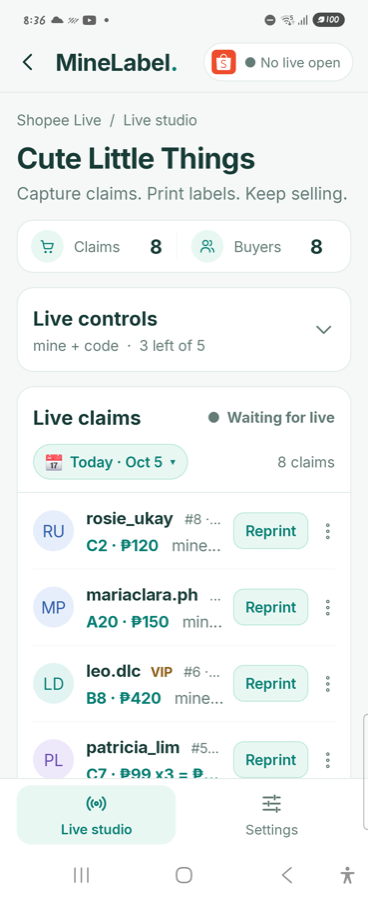
See the latest claims and stock on top of your live, and reprint with one tap without leaving it.

Buyers and payments

Every buyer's items per live with totals. Mark Unpaid, Paid or Cancelled, add or remove items, send their summary by chat.

Joy reserver protection

Tag known joy reservers: their claims show in red and never print. Blocked buyers are ignored completely.

Reports and Excel

Sales per live, top buyers and best sellers, plus an Excel export for your records.
The label

A clean label for every buyer

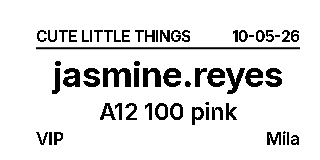
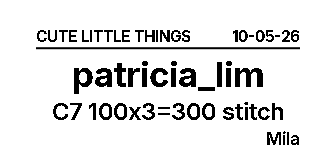
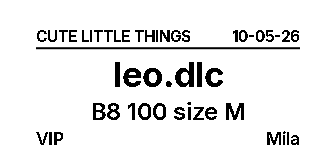
Readable at a glance when you pack. Long usernames shrink to fit, and your customer tags print too.

  • Your shop name and the live date on top
  • The buyer's username, big and clear
  • Item code, price and quantity (100x3=300)
  • Their note, like a color or size
  • VIP and your own tags, plus who hosted
Live controls

Change things mid-live, in one tap

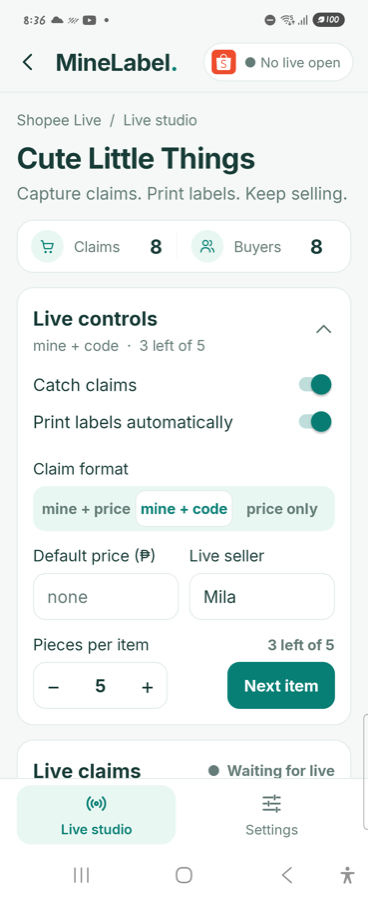
Everything you need during the live sits on one screen.

  • Switch claim format between items
  • Set a default price for comments without one
  • Pieces per item with a “Next item” button
  • Pause catching or printing anytime
  • Light or dark mode, your choice
What you need

Three things to get started

An Android phone

A second phone that watches your live. Android 7 or newer.

A label printer

A Bluetooth sticker printer. We'll help you pick and set one up.

Sticker labels

Any gap labels your printer takes, like 40×30 or 50×30 mm.

Tested with CLabel CT221B and other TSPL label printers, and Niimbot B21.

FAQ

Questions sellers ask

Do I really need two phones?

Yes. One phone hosts your live; the second phone opens your live like a viewer and runs MineLabel. That way your live never slows down and labels print beside you.

Which printers work?

Bluetooth sticker label printers that use TSPL (like the CLabel CT221B) and the Niimbot B21. Not sure about yours? Message us the model before you buy.

What if comments come very fast?

MineLabel reads the live screen many times a second and catches claims in order. If comments come faster than anyone can read them, it warns you so you can ask buyers to slow down.

Does it work with Facebook Live?

Facebook support is coming next. Today MineLabel works with Shopee Live on Android.

Is my data safe?

Claims and buyer lists stay on your phone. MineLabel only reads your live screen while you're selling, and never asks for your Shopee password.

What happens in a demo?

Message us on Messenger to pick a time. We'll show you MineLabel catching claims and printing labels on a live, answer your questions, and help you choose a printer. When you're ready, we set up your account.

Stop writing names. Start printing them.

See MineLabel catch claims and print labels on a real live. Book a free demo.

Book a free demo on Messenger